> ## Documentation Index
> Fetch the complete documentation index at: https://docs.clearspend.ai/llms.txt
> Use this file to discover all available pages before exploring further.
# Connect your card (Coming soon)
> Link credit-card accounts via Plaid to auto-detect SaaS charges in ClearSpend.
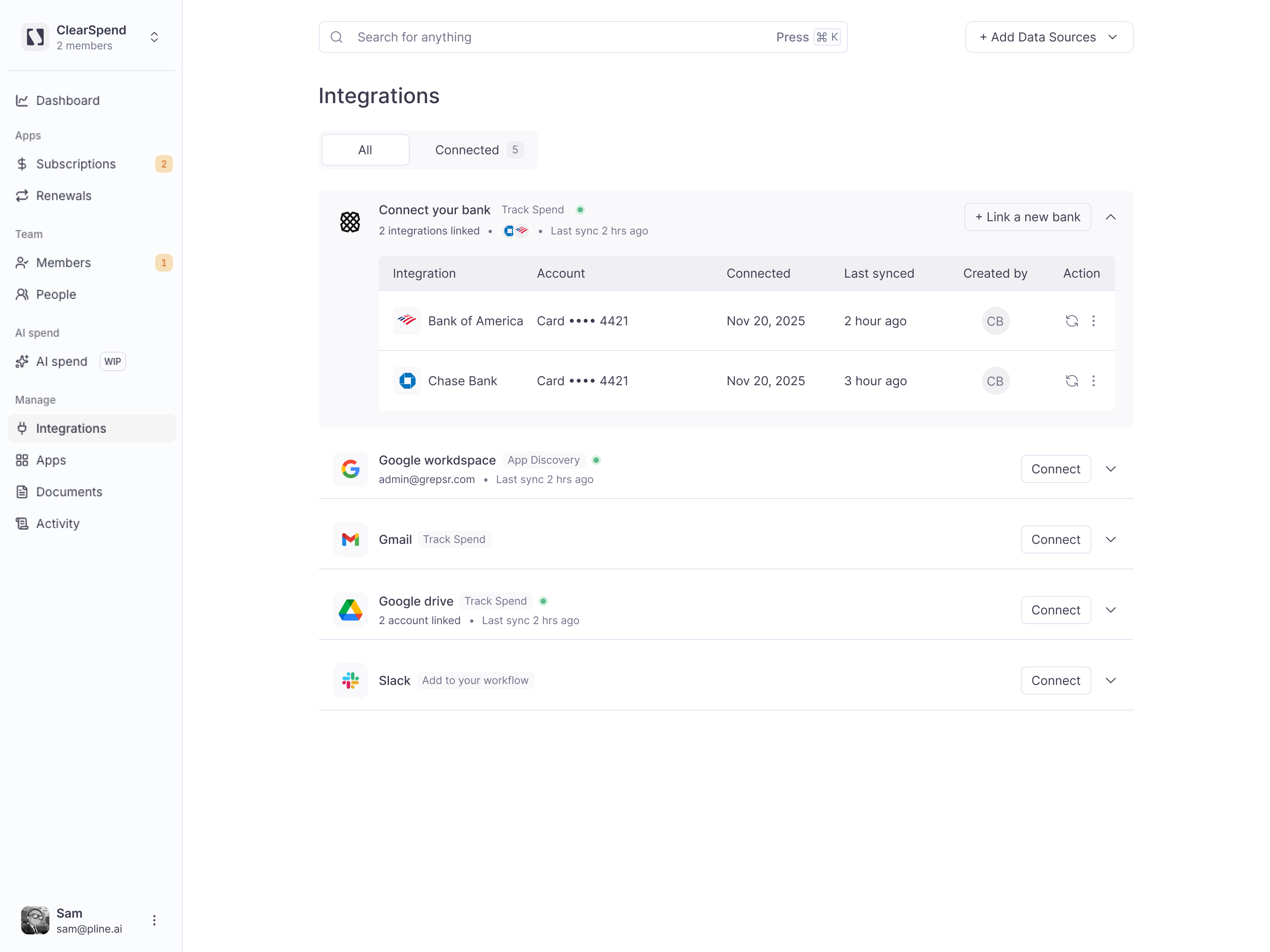
The **Connect your card** integration (tagged **Track Spend**) lets you link checking accounts and credit cards through **Plaid** so ClearSpend can automatically detect SaaS charges from your transaction history — without manual statement uploads.
## When to use Plaid
* You want **ongoing** charge detection without exporting CSVs
* Invoice emails don't exist for some vendors (e.g. card-only SaaS)
* You need **Actual Spend** dates that match your card statement
For one-time backfill without card OAuth, use [Import subscriptions](/connect/data-sources#import-subscriptions) instead. See [Plaid vs CSV](/connect/choosing-integrations#plaid-vs-csv-statement-upload).
 ## What it does
| Result | Where to see it |
| --------------------------------------------- | ----------------------------------------------------------------------------------- |
| Card transactions matched to vendors | **[Subscriptions](/features/subscriptions)** and subscription history |
| Charge dates and amounts from your statements | **[Dashboard](/features/dashboard)** spend charts (including **Actual Spend** view) |
| Transaction records for audit | **[Documents](/features/documents)** — each charge stored with full metadata |
Plaid connections run on a schedule in the background, similar to [Gmail](/connect/gmail) and [Google Drive](/connect/google-drive), so new SaaS charges appear without re-uploading CSV files.
## How it works
ClearSpend uses [Plaid Link](https://plaid.com) — the same card-connection flow used by major finance apps:
1. You choose your institution in Plaid's secure modal.
2. You authenticate directly with your card issuer (ClearSpend never sees your login credentials).
3. Plaid returns a read-only access token that ClearSpend stores encrypted.
4. ClearSpend syncs transactions and matches recurring SaaS charges to subscriptions.
ClearSpend **never stores your card credentials**. Authentication runs entirely through Plaid. Access is **read-only** — ClearSpend does not initiate payments or transfers.
## Who can connect
**Owners** and **Admins** can link and disconnect card accounts from **Integrations**, consistent with other integrations. See [Roles and permissions](/reference/roles-permissions).
## Connect your card
Navigate to **Integrations** in the sidebar.
Locate the **Connect your card** card under **Track Spend**.
Click **Connect** or **Link card account**. A Plaid modal opens to choose your institution.
Complete Plaid's authentication flow for the account or card you want to link. You can connect more than one institution over time.
After linking, ClearSpend imports recent transactions and matches SaaS charges to subscriptions. The integration card shows the linked institution and **last sync** time.
You can also start the flow from **+ Add Data Source** when connecting more data sources.
## Security
* **Read-only access** — transaction history only; no ability to move money.
* **Credentials stay with Plaid** — ClearSpend receives an encrypted token, not your card password.
* **Disconnect anytime** — revoke access from **Integrations** or through your card issuer's connected-apps settings.
* **Per-org isolation** — your transaction data stays in your ClearSpend workspace.
## Pair with other sources
Card data confirms *what was charged and when*; invoices provide contract terms, seat counts, and renewal dates. Most teams use both for the fullest picture:
* **[Import subscriptions CSV](/connect/data-sources#import-subscriptions)** — backfill historical spend before Plaid sync completes
* **[Connect Gmail](/connect/gmail)** — ongoing invoice import from billing email
* **[Forward invoice email](/connect/data-sources#forward-an-invoice-email)** — send individual invoices without OAuth
## Common questions
No. Plaid provides transaction metadata (merchant, amount, date). ClearSpend never receives or stores full account or card numbers.
Yes. Link more than one card — useful when SaaS spend is split across a company card and departmental cards.
No. Card data confirms charges and dates; invoices provide renewal terms and seat counts. Use both for the fullest picture.
## Something wrong?
| Symptom | What to do |
| ------------------------ | ---------------------------------------------------------------------------------------------------------------------- |
| Plaid modal won't open | Owner/Admin only; check plan integration limit — [Billing](/settings/billing#usage-limits) |
| No charges after linking | Wait for first sync; check [Activity](/features/activity) — [Troubleshooting](/reference/troubleshooting#integrations) |
## Related
* [Integrations overview](/connect/integrations)
* [Adding a data source](/connect/data-sources)
* [Gmail integration](/connect/gmail)
* [FAQ — card data](/reference/faq)
## What it does
| Result | Where to see it |
| --------------------------------------------- | ----------------------------------------------------------------------------------- |
| Card transactions matched to vendors | **[Subscriptions](/features/subscriptions)** and subscription history |
| Charge dates and amounts from your statements | **[Dashboard](/features/dashboard)** spend charts (including **Actual Spend** view) |
| Transaction records for audit | **[Documents](/features/documents)** — each charge stored with full metadata |
Plaid connections run on a schedule in the background, similar to [Gmail](/connect/gmail) and [Google Drive](/connect/google-drive), so new SaaS charges appear without re-uploading CSV files.
## How it works
ClearSpend uses [Plaid Link](https://plaid.com) — the same card-connection flow used by major finance apps:
1. You choose your institution in Plaid's secure modal.
2. You authenticate directly with your card issuer (ClearSpend never sees your login credentials).
3. Plaid returns a read-only access token that ClearSpend stores encrypted.
4. ClearSpend syncs transactions and matches recurring SaaS charges to subscriptions.
ClearSpend **never stores your card credentials**. Authentication runs entirely through Plaid. Access is **read-only** — ClearSpend does not initiate payments or transfers.
## Who can connect
**Owners** and **Admins** can link and disconnect card accounts from **Integrations**, consistent with other integrations. See [Roles and permissions](/reference/roles-permissions).
## Connect your card
Navigate to **Integrations** in the sidebar.
Locate the **Connect your card** card under **Track Spend**.
Click **Connect** or **Link card account**. A Plaid modal opens to choose your institution.
Complete Plaid's authentication flow for the account or card you want to link. You can connect more than one institution over time.
After linking, ClearSpend imports recent transactions and matches SaaS charges to subscriptions. The integration card shows the linked institution and **last sync** time.
You can also start the flow from **+ Add Data Source** when connecting more data sources.
## Security
* **Read-only access** — transaction history only; no ability to move money.
* **Credentials stay with Plaid** — ClearSpend receives an encrypted token, not your card password.
* **Disconnect anytime** — revoke access from **Integrations** or through your card issuer's connected-apps settings.
* **Per-org isolation** — your transaction data stays in your ClearSpend workspace.
## Pair with other sources
Card data confirms *what was charged and when*; invoices provide contract terms, seat counts, and renewal dates. Most teams use both for the fullest picture:
* **[Import subscriptions CSV](/connect/data-sources#import-subscriptions)** — backfill historical spend before Plaid sync completes
* **[Connect Gmail](/connect/gmail)** — ongoing invoice import from billing email
* **[Forward invoice email](/connect/data-sources#forward-an-invoice-email)** — send individual invoices without OAuth
## Common questions
No. Plaid provides transaction metadata (merchant, amount, date). ClearSpend never receives or stores full account or card numbers.
Yes. Link more than one card — useful when SaaS spend is split across a company card and departmental cards.
No. Card data confirms charges and dates; invoices provide renewal terms and seat counts. Use both for the fullest picture.
## Something wrong?
| Symptom | What to do |
| ------------------------ | ---------------------------------------------------------------------------------------------------------------------- |
| Plaid modal won't open | Owner/Admin only; check plan integration limit — [Billing](/settings/billing#usage-limits) |
| No charges after linking | Wait for first sync; check [Activity](/features/activity) — [Troubleshooting](/reference/troubleshooting#integrations) |
## Related
* [Integrations overview](/connect/integrations)
* [Adding a data source](/connect/data-sources)
* [Gmail integration](/connect/gmail)
* [FAQ — card data](/reference/faq)