> ## Documentation Index
> Fetch the complete documentation index at: https://docs.clearspend.ai/llms.txt
> Use this file to discover all available pages before exploring further.
# How data enters ClearSpend
> Every path for subscriptions, charges, and supporting documents — and what counts toward KPIs and charts.
ClearSpend separates **verified charges** (from card statements or Plaid) from **supporting documents** (invoices and receipts). Only verified charges drive KPI cards, charts, and dashboard totals. Invoices help match and reconcile spend — they do not create spend on their own.
## Charges vs. supporting documents
| Data type | How it arrives | Creates a subscription? | Counts in KPIs and charts? |
| ----------------------- | ------------------------------------------------------------------------ | ------------------------------------------------ | ----------------------------------- |
| **Charge** | **Card statement** (CSV import) or **Plaid** sync | Yes — verified subscription | **Yes** |
| **Invoice / receipt** | Upload, forwarded email, Gmail/Drive sync, Chrome extension, public link | Yes — temporary subscription in **Needs review** | **No** (until a charge confirms it) |
| **Manual subscription** | **Add Manually** in **+ Add Data Source** | Yes — row on Overview | **No** (until a charge confirms it) |
**Invoice-only amounts never appear in KPI cards, spending trend charts, or dashboard widgets** — even if you manually approve the subscription and it moves to Overview. ClearSpend needs a matching **charge** from a statement import or Plaid before that spend is included in totals.
### Invoice-only lifecycle
```mermaid theme={null}
flowchart LR
A[Upload or forward invoice] --> B[Temporary subscription]
B --> C[Needs review tab]
C --> D{Charge arrives?}
D -->|Statement or Plaid| E[Verified subscription]
E --> F[Amounts in KPIs and charts]
D -->|Manual approve only| G[Overview tab]
G --> H[Still excluded from KPIs until charge]
```
1. **Upload or forward an invoice** with no matching charge → ClearSpend creates a **temporary subscription** and places it on **Subscriptions → Needs review**.
2. **A charge arrives** (statement CSV or Plaid) for the same vendor → the subscription is **verified** and linked to real spend. Amounts then flow into KPIs and charts automatically.
3. **You approve manually** without a charge → the subscription moves to **Overview**, but its amount **stays out of KPIs and charts** until ClearSpend receives a charge from a statement or Plaid.
See [Needs review](/features/subscriptions#needs-review) for the approval workflow.
## + Add Data Source menu
The **+ Add Data Source** button (top-right) is the primary entry point for uploads and manual rows.
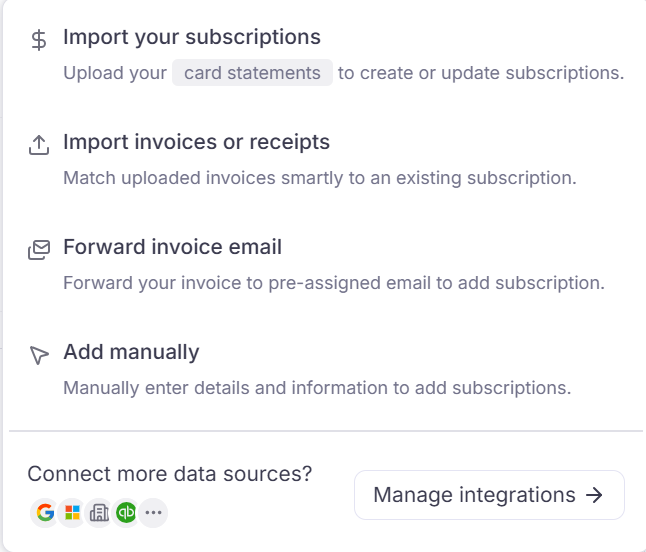 | Menu item | What it does | KPI impact |
| -------------------------------------------------------- | ------------------------------------------------------------------------------------ | --------------------------------------------------------------- |
| **Import your Subscriptions** | Upload **card statements** (CSV) to create or update subscriptions from real charges | ✅ Charges count in KPIs |
| **Upload Invoices/Receipts** | Attach PDF/JPG files; matched to existing subscriptions when possible | ❌ Supporting document only |
| **Forward invoice email** | Forward billing email to your workspace `@clearspend.cc` address | ❌ Supporting document only |
| **Add Manually** | Enter vendor, amount, and billing cycle yourself | ❌ No charge until statement/Plaid |
| **Connect more data sources?** → **Manage integrations** | Open [Integrations](/connect/integrations) (Google Workspace, Gmail, Plaid, …) | ✅ Plaid charges count; invoice integrations add supporting docs |
Details for each option: [Adding a data source](/connect/data-sources).
## Other entry paths
| Path | Best for | KPI impact |
| ----------------------------------------------------------------------------------------------- | ---------------------------------------------- | ------------------------------------------- |
| [Integrations](/connect/integrations) — [Plaid](/connect/connect-your-bank) | Ongoing card transaction sync | ✅ Charges count |
| [Integrations](/connect/integrations) — [Gmail](/connect/gmail), [Drive](/connect/google-drive) | Invoice discovery and import | Depends on file type (statement vs invoice) |
| [Chrome extension](/connect/chrome-extension) | Upload from browser toolbar or download banner | Depends on file type (statement vs invoice) |
| [Public upload link](/connect/public-upload) | Collect invoices from someone without a login | ❌ Supporting documents |
| [Google Workspace](/connect/google-workspace) | App discovery and usage signals | Usage only — not spend totals |
## What each layer contributes
* **Charges (statements + Plaid)** — source of truth for **what was actually paid**. These drive subscription amounts, KPI cards, spending trend, and reconciliation views.
* **Invoices and receipts** — **supporting documents** for reconciliation, audit trails, and matching charges to vendors. They can create or update subscription metadata but do not add spend to charts without a charge.
* **Integrations and the extension** — add **usage** and **app discovery** (logins, OAuth grants, directory users) in addition to documents or transactions.
* **Grouping** on the Subscriptions page rolls related rows under one vendor without deleting history.
## Quick decision guide
| Your goal | Start here |
| ---------------------------------------- | ---------------------------------------------------------------------------------- |
| Backfill spend history and populate KPIs | **Import your Subscriptions** (CSV) or connect [Plaid](/connect/connect-your-bank) |
| Attach proof to an existing subscription | **Upload Invoices/Receipts** or forward email |
| Vendor with no invoices yet | **Add Manually**, then import a statement or connect Plaid when charges appear |
| Triage invoice-only detections | **Subscriptions → Needs review** |
For accurate dashboard totals, connect at least one **charge source** (statement import or Plaid) before relying on invoice uploads alone. See [Choosing integrations](/connect/choosing-integrations) if you are unsure which connection to add first.
## Related
* [Adding a data source](/connect/data-sources) — step-by-step for each menu item
* [Needs review](/features/subscriptions#needs-review) — approve, reject, and understand unverified spend
* [Dashboard](/features/dashboard) — what counts in KPI widgets
* [Troubleshooting — KPIs show \$0](/reference/troubleshooting#kpis-and-charts-show-0-after-invoice-upload)
| Menu item | What it does | KPI impact |
| -------------------------------------------------------- | ------------------------------------------------------------------------------------ | --------------------------------------------------------------- |
| **Import your Subscriptions** | Upload **card statements** (CSV) to create or update subscriptions from real charges | ✅ Charges count in KPIs |
| **Upload Invoices/Receipts** | Attach PDF/JPG files; matched to existing subscriptions when possible | ❌ Supporting document only |
| **Forward invoice email** | Forward billing email to your workspace `@clearspend.cc` address | ❌ Supporting document only |
| **Add Manually** | Enter vendor, amount, and billing cycle yourself | ❌ No charge until statement/Plaid |
| **Connect more data sources?** → **Manage integrations** | Open [Integrations](/connect/integrations) (Google Workspace, Gmail, Plaid, …) | ✅ Plaid charges count; invoice integrations add supporting docs |
Details for each option: [Adding a data source](/connect/data-sources).
## Other entry paths
| Path | Best for | KPI impact |
| ----------------------------------------------------------------------------------------------- | ---------------------------------------------- | ------------------------------------------- |
| [Integrations](/connect/integrations) — [Plaid](/connect/connect-your-bank) | Ongoing card transaction sync | ✅ Charges count |
| [Integrations](/connect/integrations) — [Gmail](/connect/gmail), [Drive](/connect/google-drive) | Invoice discovery and import | Depends on file type (statement vs invoice) |
| [Chrome extension](/connect/chrome-extension) | Upload from browser toolbar or download banner | Depends on file type (statement vs invoice) |
| [Public upload link](/connect/public-upload) | Collect invoices from someone without a login | ❌ Supporting documents |
| [Google Workspace](/connect/google-workspace) | App discovery and usage signals | Usage only — not spend totals |
## What each layer contributes
* **Charges (statements + Plaid)** — source of truth for **what was actually paid**. These drive subscription amounts, KPI cards, spending trend, and reconciliation views.
* **Invoices and receipts** — **supporting documents** for reconciliation, audit trails, and matching charges to vendors. They can create or update subscription metadata but do not add spend to charts without a charge.
* **Integrations and the extension** — add **usage** and **app discovery** (logins, OAuth grants, directory users) in addition to documents or transactions.
* **Grouping** on the Subscriptions page rolls related rows under one vendor without deleting history.
## Quick decision guide
| Your goal | Start here |
| ---------------------------------------- | ---------------------------------------------------------------------------------- |
| Backfill spend history and populate KPIs | **Import your Subscriptions** (CSV) or connect [Plaid](/connect/connect-your-bank) |
| Attach proof to an existing subscription | **Upload Invoices/Receipts** or forward email |
| Vendor with no invoices yet | **Add Manually**, then import a statement or connect Plaid when charges appear |
| Triage invoice-only detections | **Subscriptions → Needs review** |
For accurate dashboard totals, connect at least one **charge source** (statement import or Plaid) before relying on invoice uploads alone. See [Choosing integrations](/connect/choosing-integrations) if you are unsure which connection to add first.
## Related
* [Adding a data source](/connect/data-sources) — step-by-step for each menu item
* [Needs review](/features/subscriptions#needs-review) — approve, reject, and understand unverified spend
* [Dashboard](/features/dashboard) — what counts in KPI widgets
* [Troubleshooting — KPIs show \$0](/reference/troubleshooting#kpis-and-charts-show-0-after-invoice-upload)