> ## Documentation Index
> Fetch the complete documentation index at: https://docs.clearspend.ai/llms.txt
> Use this file to discover all available pages before exploring further.
# Documents
> Search, filter, and export every invoice and statement ClearSpend has collected.
The Documents page lists every invoice and statement in your workspace so you can search, download, and audit what backed each charge.
Sources include manual upload, forwarded email, Gmail/Drive, the Chrome extension, and public upload links. Each row shows a **Source** label (with icon) so you can see where a file originated.
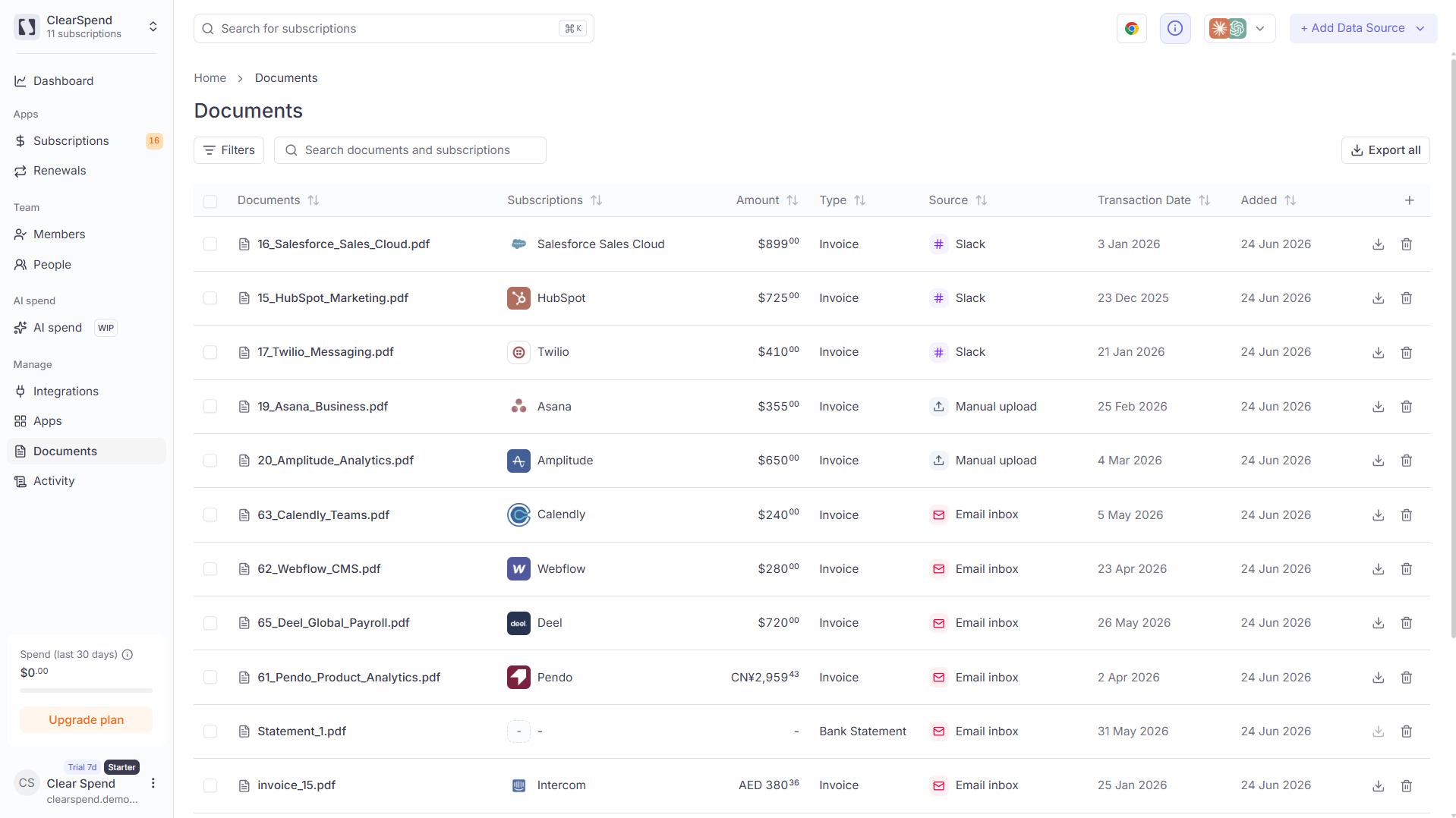 ## Table columns
| Column | Description |
| -------------------- | ------------------------------------------------------------ |
| **Documents** | File name |
| **Subscriptions** | The vendor/subscription this document is matched to |
| **Amount** | The amount on the document |
| **Type** | Document type: **Invoice** or **Card Statement** |
| **Source** | How the file arrived (manual upload, Gmail, extension, etc.) |
| **Transaction date** | The date of the transaction or invoice |
| **Added** | Date the document was added to ClearSpend |
Each row has **Download** (↓) and **Delete** (🗑) action icons on the right.
## Filtering and search
Use the **Filters** button to narrow by document type or other attributes. The search field accepts both document names and subscription names.
## Bulk actions
Select multiple documents to **Delete** or **Reparse**. Reparse re-runs OCR and extraction on the selected files — useful when a document failed to match initially or after you update [processing rules](/settings/processing-rules).
## Bulk export
Click **Export all** in the top-right to download all documents in the current view, convenient at month-end close.
## Table columns
| Column | Description |
| -------------------- | ------------------------------------------------------------ |
| **Documents** | File name |
| **Subscriptions** | The vendor/subscription this document is matched to |
| **Amount** | The amount on the document |
| **Type** | Document type: **Invoice** or **Card Statement** |
| **Source** | How the file arrived (manual upload, Gmail, extension, etc.) |
| **Transaction date** | The date of the transaction or invoice |
| **Added** | Date the document was added to ClearSpend |
Each row has **Download** (↓) and **Delete** (🗑) action icons on the right.
## Filtering and search
Use the **Filters** button to narrow by document type or other attributes. The search field accepts both document names and subscription names.
## Bulk actions
Select multiple documents to **Delete** or **Reparse**. Reparse re-runs OCR and extraction on the selected files — useful when a document failed to match initially or after you update [processing rules](/settings/processing-rules).
## Bulk export
Click **Export all** in the top-right to download all documents in the current view, convenient at month-end close.