> ## Documentation Index
> Fetch the complete documentation index at: https://docs.clearspend.ai/llms.txt
> Use this file to discover all available pages before exploring further.
# Home
> Your workspace landing page: reconciliation KPIs, spending trend, and widgets.
**Home** is the first page you see after login. It is the **Home** item at the top of the sidebar (workspace root).
Until ClearSpend has at least one charge, Home shows **Get started**. After charges arrive, it shows three KPI cards, a spending trend chart, and widgets you can show, hide, or reorder.
**Subscriptions → Dashboard** in the sidebar opens this same page. The active highlight stays on **Home**.
## Before charges arrive
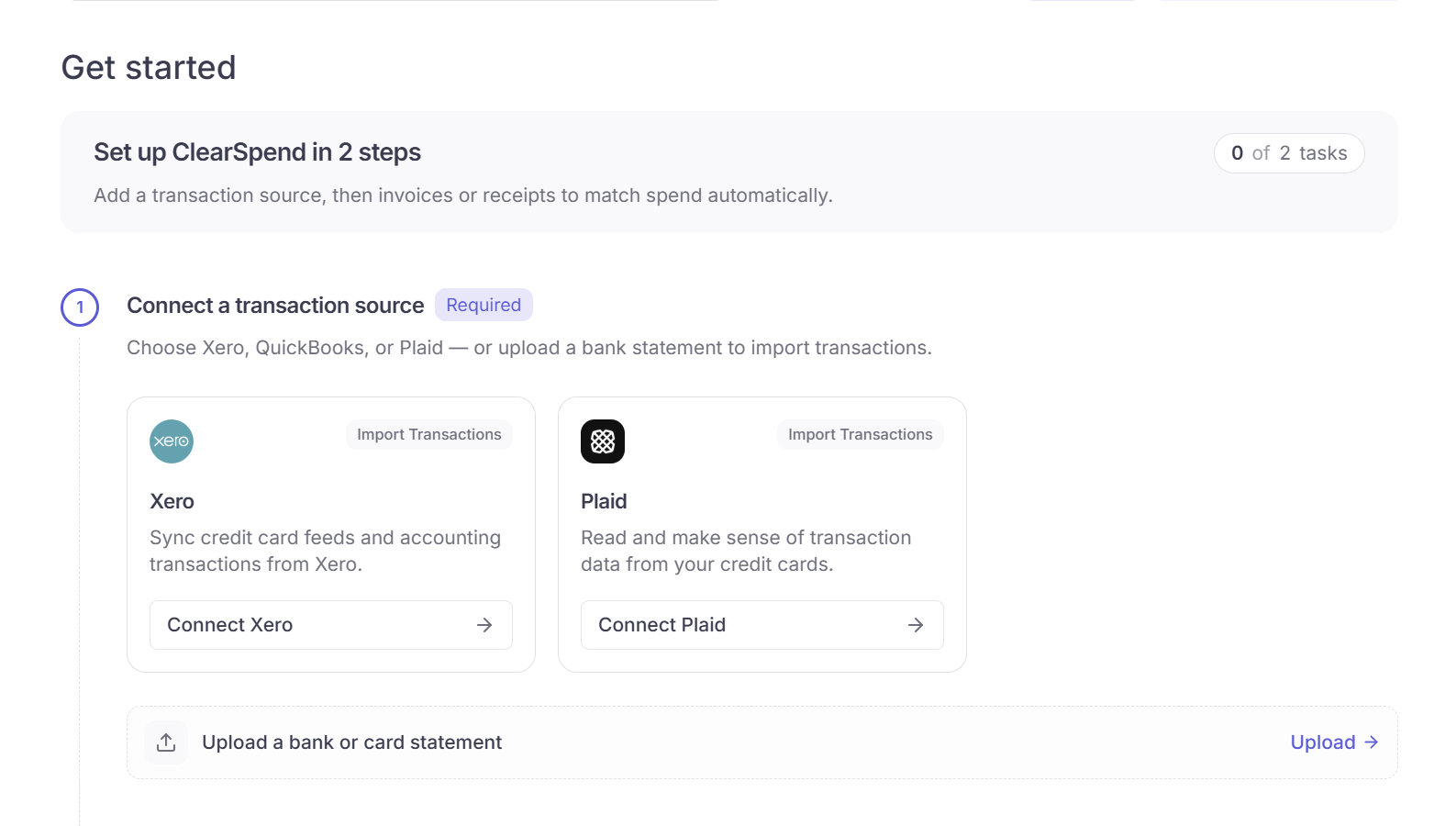
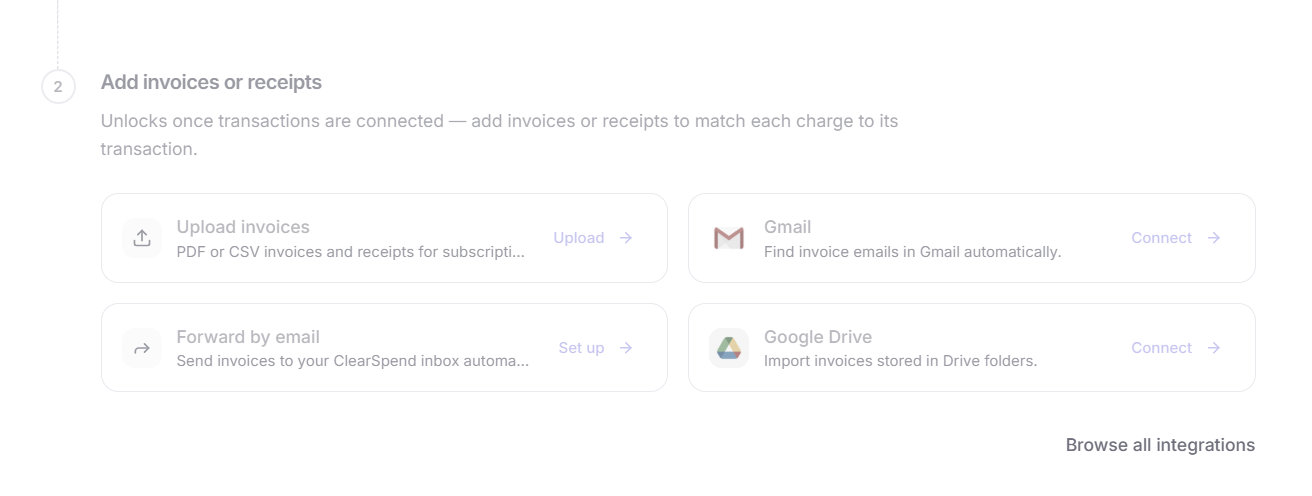
Home embeds **Get started** until a transaction is in the workspace. Complete two steps:
| Step | What to do |
| ----------------------------------- | -------------------------------------------------------------------------------------------------------------------------- |
| **1. Connect a transaction source** | [Plaid](/connect/connect-your-bank), upload a card statement (PDF or CSV), or [connect Xero](/connect/xero) for later sync |
| **2. Add invoices or receipts** | Upload files, [Gmail](/connect/gmail), [Google Drive](/connect/google-drive), or forward by email |
 Xero does not import spend. Use Plaid or a statement if you need charges on Home.
Full walkthrough: [Onboarding](/onboarding).
## After charges arrive
The page switches to the dashboard layout:
1. Header with a date filter and a **Show/Hide Charts** control
2. Optional setup reminder if invoices or receipts are still missing
3. Three KPI cards
4. **Spending trend**
5. Widget grid
If you already have charges but no invoice or receipt yet, a reminder stays above the KPIs until you add proof. You can dismiss it for that workspace.
Xero does not import spend. Use Plaid or a statement if you need charges on Home.
Full walkthrough: [Onboarding](/onboarding).
## After charges arrive
The page switches to the dashboard layout:
1. Header with a date filter and a **Show/Hide Charts** control
2. Optional setup reminder if invoices or receipts are still missing
3. Three KPI cards
4. **Spending trend**
5. Widget grid
If you already have charges but no invoice or receipt yet, a reminder stays above the KPIs until you add proof. You can dismiss it for that workspace.
 ## KPI cards
Three equal cards at the top. They follow the date filter in the header.
| Card | What it shows |
| --------------------- | -------------------------------------------------------------------------------------------------------------------------------------------------------- |
| **Total charges** | Sum of charges in the selected period, plus how many charges that is |
| **Reconciliation** | Charge value matched to an invoice or receipt, as `$matched of $total`, with a percent bar. Caption lists reconciled vs unreconciled counts |
| **Upcoming Renewals** | Count of subscriptions renewing in the **next 30 days**, with the amount due. Vendor logos and **View all renewals** open [Renewals](/features/renewals) |
The Reconciliation card is based on **charge value** (dollars), not charge count.
## KPI cards
Three equal cards at the top. They follow the date filter in the header.
| Card | What it shows |
| --------------------- | -------------------------------------------------------------------------------------------------------------------------------------------------------- |
| **Total charges** | Sum of charges in the selected period, plus how many charges that is |
| **Reconciliation** | Charge value matched to an invoice or receipt, as `$matched of $total`, with a percent bar. Caption lists reconciled vs unreconciled counts |
| **Upcoming Renewals** | Count of subscriptions renewing in the **next 30 days**, with the amount due. Vendor logos and **View all renewals** open [Renewals](/features/renewals) |
The Reconciliation card is based on **charge value** (dollars), not charge count.
 Home hides **Avg monthly**. That card lives on [Transactions Overview](/features/transactions-overview).
## Spending trend
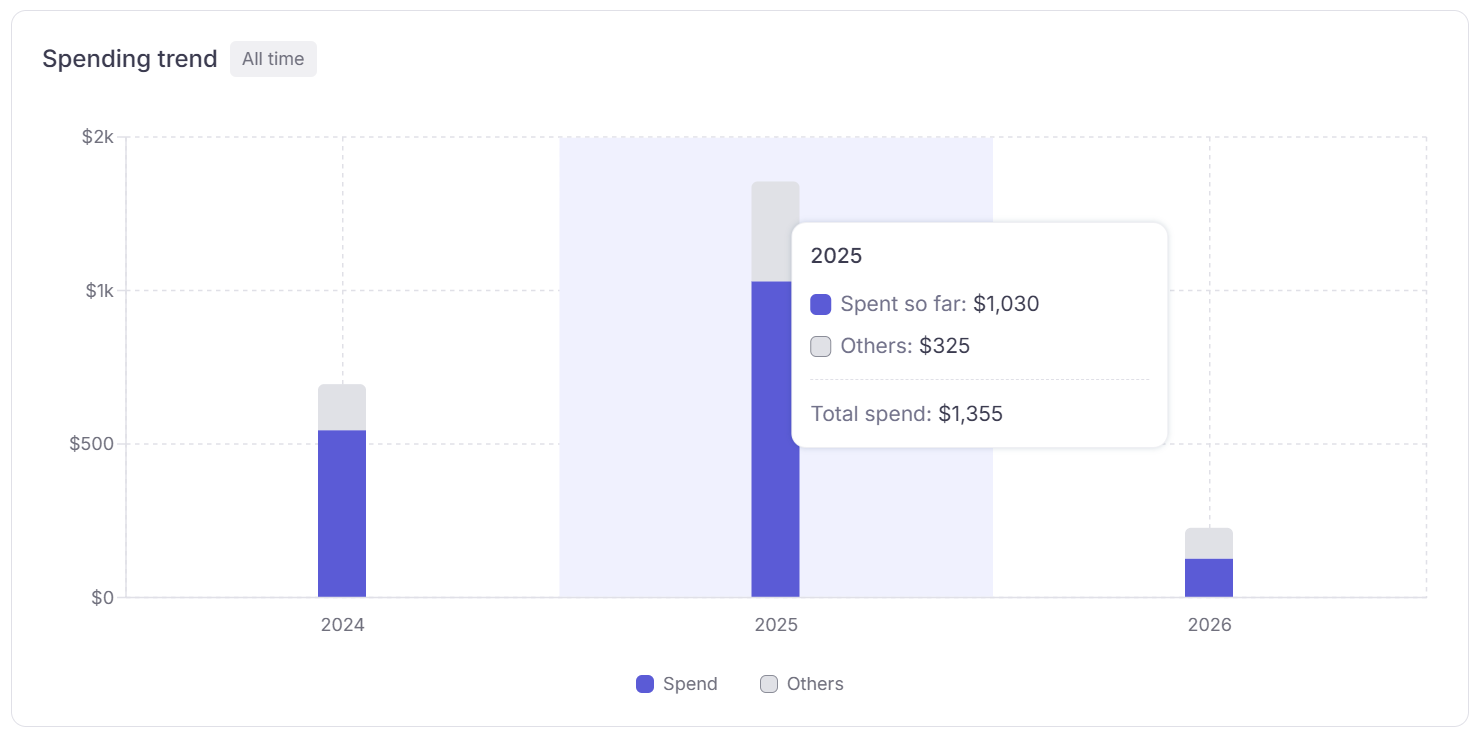
The bar chart under the KPIs shows spend by month for the selected window.
| Segment | Meaning |
| ---------- | ---------------------------------------------------------------------------------------- |
| **Spend** | Subscription spend |
| **Others** | Non-subscription charges (travel, hardware, and similar). Shown when those charges exist |
Future months can appear as projected bars. Hover a month for the breakdown.
Changing the date filter rescopes this chart together with the KPIs and widgets.
Home hides **Avg monthly**. That card lives on [Transactions Overview](/features/transactions-overview).
## Spending trend
The bar chart under the KPIs shows spend by month for the selected window.
| Segment | Meaning |
| ---------- | ---------------------------------------------------------------------------------------- |
| **Spend** | Subscription spend |
| **Others** | Non-subscription charges (travel, hardware, and similar). Shown when those charges exist |
Future months can appear as projected bars. Hover a month for the breakdown.
Changing the date filter rescopes this chart together with the KPIs and widgets.
 ## Widgets
Below the trend chart, widgets sit in a grid. Drag a widget to reorder. Use the **⋯** menu on a widget to hide it. Use the filter button in the header (**Show/Hide Charts**) to turn widgets back on. Layout is saved per workspace.
| Widget | What it shows |
| ------------------------- | --------------------------------------------------------------------------------------------- |
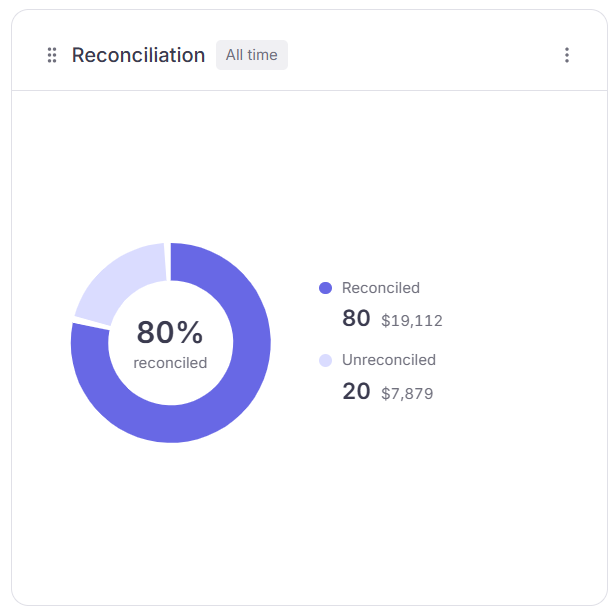
| **Reconciliation** | Donut of reconciled vs unreconciled **charge counts** for the period |
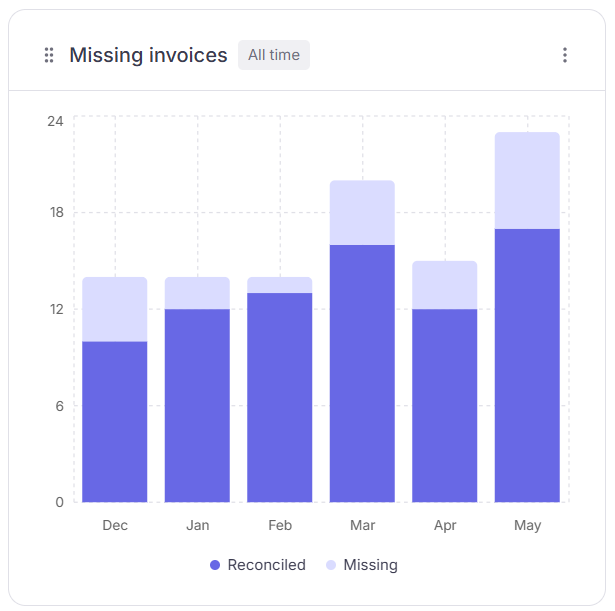
| **Missing invoices** | Stacked bars by month: reconciled vs missing proof |
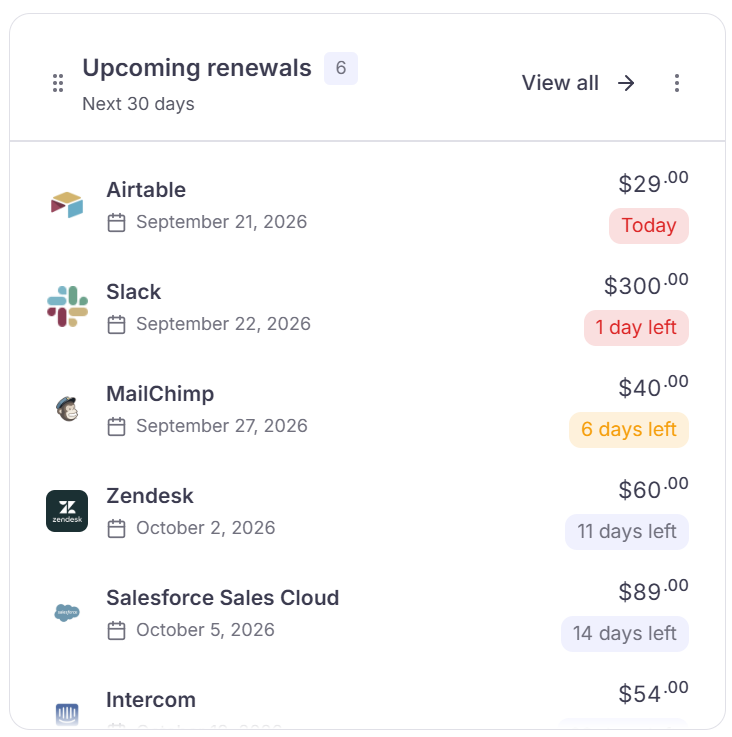
| **Upcoming renewals** | Subscriptions renewing in the next 30 days. **View all** opens [Renewals](/features/renewals) |
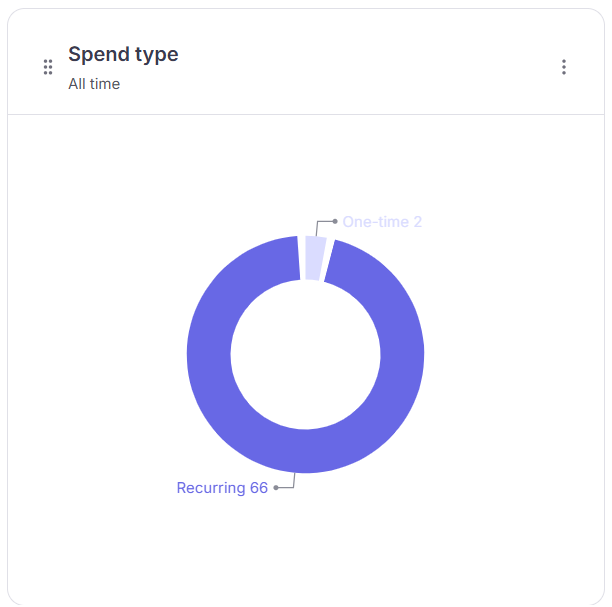
| **Spend type** | Donut of **Recurring** vs **One-time** subscriptions. Labels are counts; hover for spend |
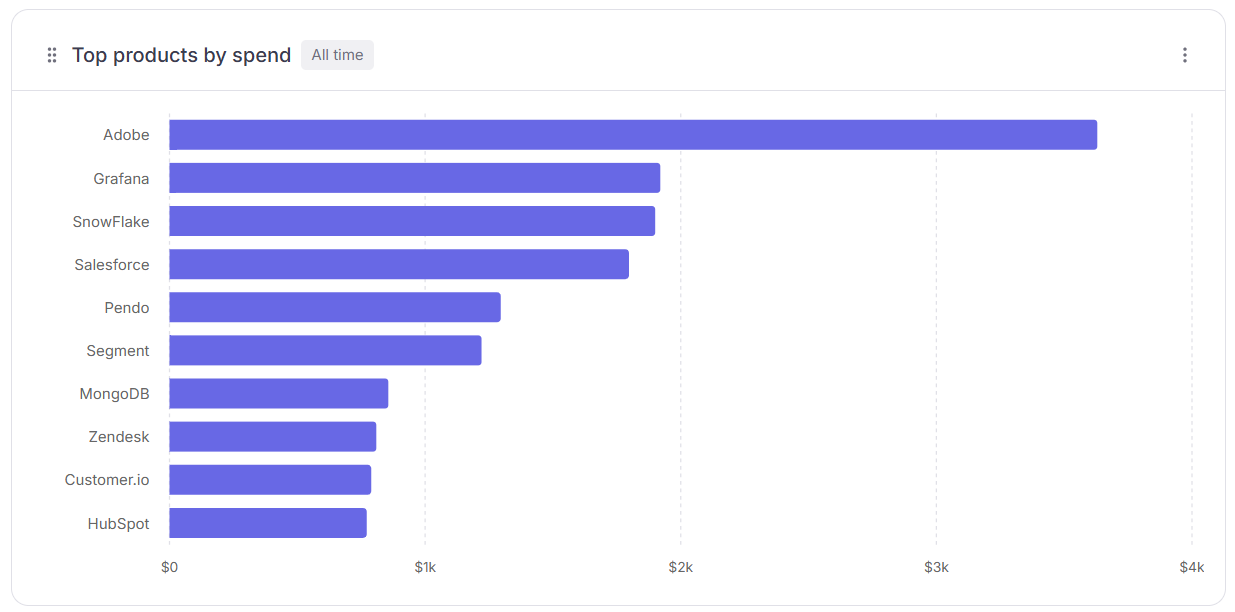
| **Top products by spend** | Horizontal bars of highest-cost vendors in the period |
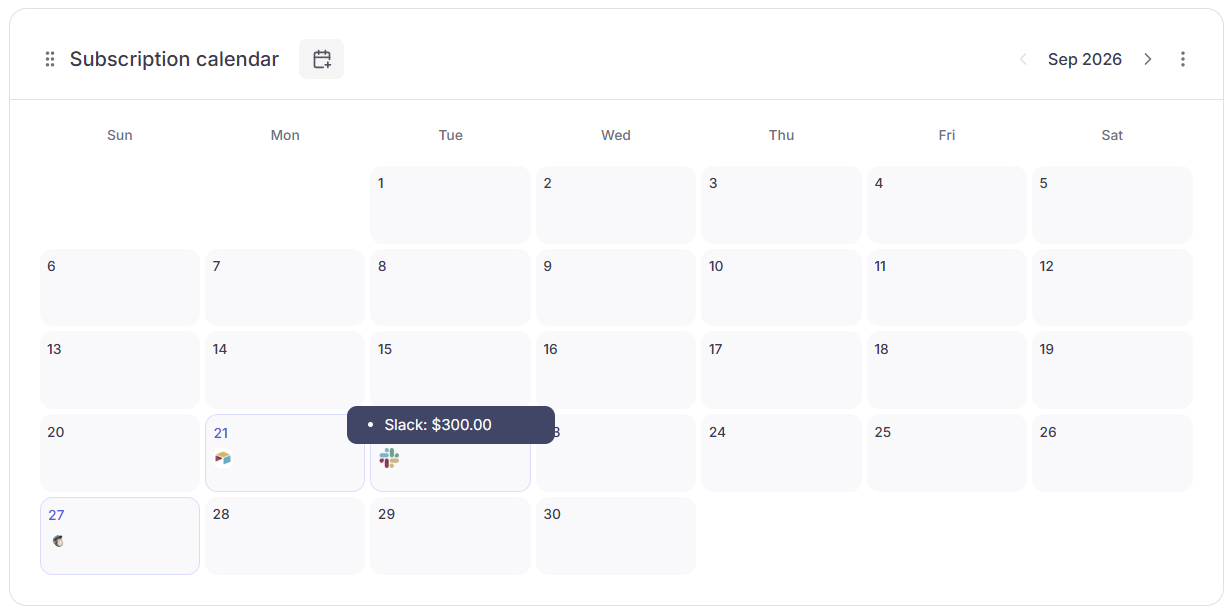
| **Subscription calendar** | Month view with vendor logos on renewal dates. Use the arrows to change month |
Reconciliation and Missing invoices sit on one row. Upcoming renewals and Spend type sit on another.
## Widgets
Below the trend chart, widgets sit in a grid. Drag a widget to reorder. Use the **⋯** menu on a widget to hide it. Use the filter button in the header (**Show/Hide Charts**) to turn widgets back on. Layout is saved per workspace.
| Widget | What it shows |
| ------------------------- | --------------------------------------------------------------------------------------------- |
| **Reconciliation** | Donut of reconciled vs unreconciled **charge counts** for the period |
| **Missing invoices** | Stacked bars by month: reconciled vs missing proof |
| **Upcoming renewals** | Subscriptions renewing in the next 30 days. **View all** opens [Renewals](/features/renewals) |
| **Spend type** | Donut of **Recurring** vs **One-time** subscriptions. Labels are counts; hover for spend |
| **Top products by spend** | Horizontal bars of highest-cost vendors in the period |
| **Subscription calendar** | Month view with vendor logos on renewal dates. Use the arrows to change month |
Reconciliation and Missing invoices sit on one row. Upcoming renewals and Spend type sit on another.
 ## Date filter
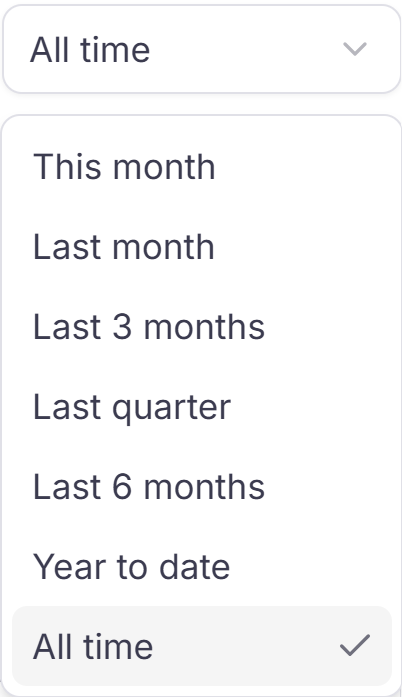
Top right of Home. Default is **All time**. The filter applies to KPIs, spending trend, and widgets.
| Option | Range |
| ------------- | -------------------------------------------- |
| This month | First day of this month through today |
| Last month | Full prior calendar month |
| Last 3 months | Three full calendar months ending last month |
| Last quarter | Full prior calendar quarter |
| Last 6 months | Six full calendar months ending last month |
| Year to date | January 1 through today |
| All time | All available data |
## What counts on Home
KPI totals and the spending trend use **charges** already in ClearSpend.
| Source | Counts as spend? |
| ----------------------------------- | ----------------------------------------- |
| [Plaid](/connect/connect-your-bank) | Yes |
| Statement upload (PDF or CSV) | Yes |
| [Xero](/connect/xero) | No (sync destination, not a spend source) |
| Invoice or receipt upload | No (proof for matching) |
| Gmail, Drive, Slack, WhatsApp | No (proof only) |
Charges typed as **Others** are excluded from subscription totals. They still appear as the grey **Others** segment on spending trend. Blank category is treated as subscription spend. See [Subscription spend vs. Others](/features/dashboard#subscription-spend-vs-others).
## Home vs Transactions Overview
| Page | Use it to |
| ------------------------------------------------------------ | ------------------------------------------------------------------------ |
| **Home** | Workspace snapshot: charge totals, match progress, spend trend, renewals |
| **[Transactions Overview](/features/transactions-overview)** | Reconciliation-only view, including **Avg monthly** |
| **[Transactions](/features/transactions)** | Work each charge: match, request, assign owner, sync |
## Something wrong?
| Symptom | What to do |
| ----------------------------------- | -------------------------------------------------------------------------------------------- |
| Get started never leaves | No charge yet. Upload a statement or connect [Plaid](/connect/connect-your-bank) |
| KPIs show \$0 | Check the date filter, or confirm charges exist on [Transactions](/features/transactions) |
| Totals ignore invoices you uploaded | Expected. Invoices are proof until they match a charge |
| Vendor missing from spend | Type may be **Others**. [Fix the category](/features/dashboard#subscription-spend-vs-others) |
| Widget missing | Open **Show/Hide Charts** in the header and enable it |
## Next steps
| I want to… | Go to |
| ----------------------------- | -------------------------------------------------------- |
| Reconcile charges | [Transactions](/features/transactions) |
| See match rate in more detail | [Transactions Overview](/features/transactions-overview) |
| Import more spend or proof | [Import transactions](/connect/data-sources) |
| Track renewals | [Renewals](/features/renewals) |
| Review subscriptions | [Subscriptions](/features/subscriptions) |
## Date filter
Top right of Home. Default is **All time**. The filter applies to KPIs, spending trend, and widgets.
| Option | Range |
| ------------- | -------------------------------------------- |
| This month | First day of this month through today |
| Last month | Full prior calendar month |
| Last 3 months | Three full calendar months ending last month |
| Last quarter | Full prior calendar quarter |
| Last 6 months | Six full calendar months ending last month |
| Year to date | January 1 through today |
| All time | All available data |
## What counts on Home
KPI totals and the spending trend use **charges** already in ClearSpend.
| Source | Counts as spend? |
| ----------------------------------- | ----------------------------------------- |
| [Plaid](/connect/connect-your-bank) | Yes |
| Statement upload (PDF or CSV) | Yes |
| [Xero](/connect/xero) | No (sync destination, not a spend source) |
| Invoice or receipt upload | No (proof for matching) |
| Gmail, Drive, Slack, WhatsApp | No (proof only) |
Charges typed as **Others** are excluded from subscription totals. They still appear as the grey **Others** segment on spending trend. Blank category is treated as subscription spend. See [Subscription spend vs. Others](/features/dashboard#subscription-spend-vs-others).
## Home vs Transactions Overview
| Page | Use it to |
| ------------------------------------------------------------ | ------------------------------------------------------------------------ |
| **Home** | Workspace snapshot: charge totals, match progress, spend trend, renewals |
| **[Transactions Overview](/features/transactions-overview)** | Reconciliation-only view, including **Avg monthly** |
| **[Transactions](/features/transactions)** | Work each charge: match, request, assign owner, sync |
## Something wrong?
| Symptom | What to do |
| ----------------------------------- | -------------------------------------------------------------------------------------------- |
| Get started never leaves | No charge yet. Upload a statement or connect [Plaid](/connect/connect-your-bank) |
| KPIs show \$0 | Check the date filter, or confirm charges exist on [Transactions](/features/transactions) |
| Totals ignore invoices you uploaded | Expected. Invoices are proof until they match a charge |
| Vendor missing from spend | Type may be **Others**. [Fix the category](/features/dashboard#subscription-spend-vs-others) |
| Widget missing | Open **Show/Hide Charts** in the header and enable it |
## Next steps
| I want to… | Go to |
| ----------------------------- | -------------------------------------------------------- |
| Reconcile charges | [Transactions](/features/transactions) |
| See match rate in more detail | [Transactions Overview](/features/transactions-overview) |
| Import more spend or proof | [Import transactions](/connect/data-sources) |
| Track renewals | [Renewals](/features/renewals) |
| Review subscriptions | [Subscriptions](/features/subscriptions) |