> ## Documentation Index
> Fetch the complete documentation index at: https://docs.clearspend.ai/llms.txt
> Use this file to discover all available pages before exploring further.
# Renewals
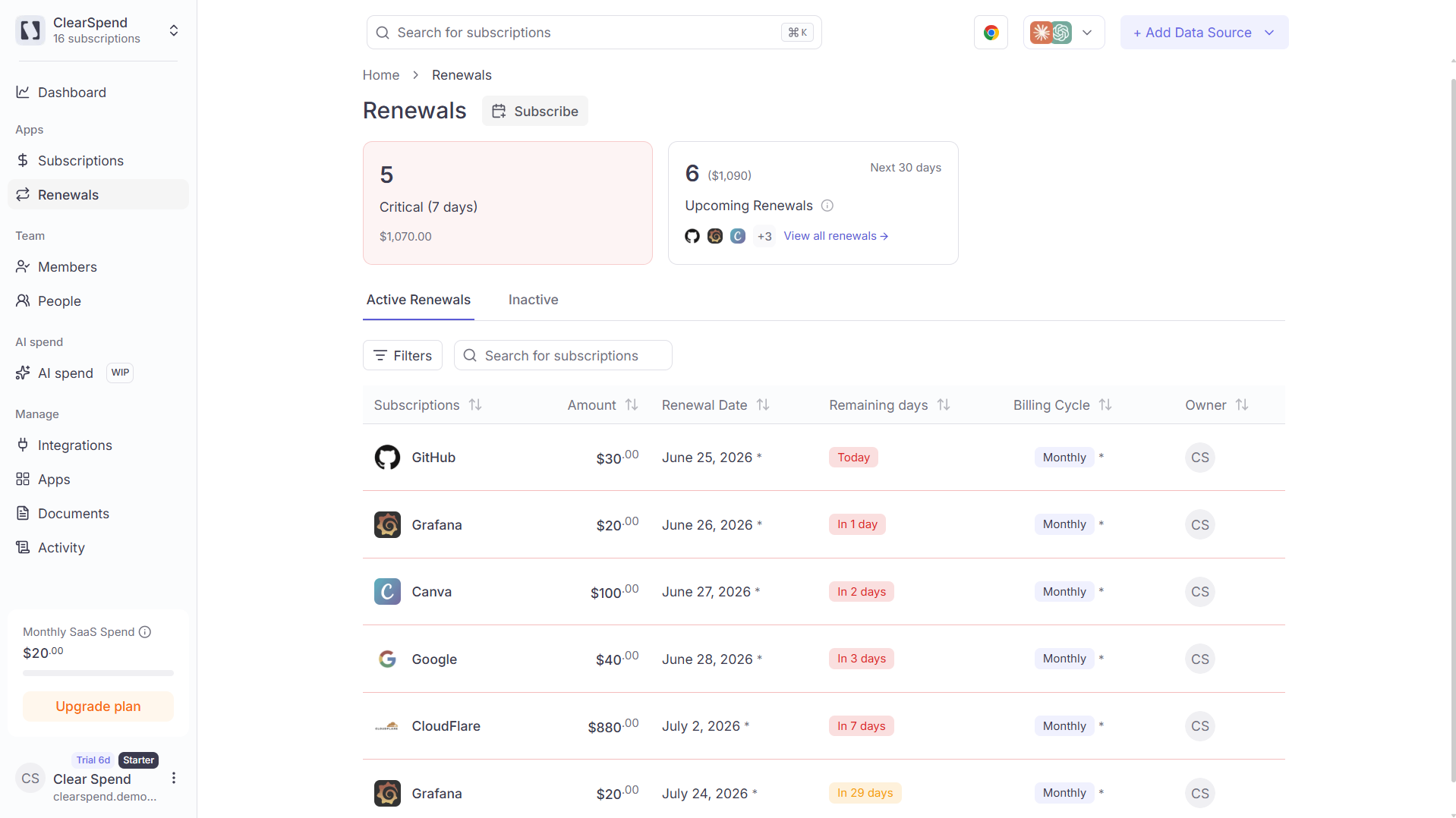
> View upcoming renewals, filter by owner or billing cycle, and add dates to your calendar.
The Renewals page lists every upcoming auto-renewal so you can review spend at risk and act before a charge goes through.
 ## Header KPIs
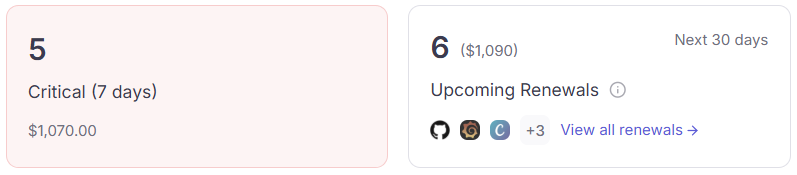 Two summary cards anchor the top:
| KPI | What it shows |
| ----------------------------------- | ----------------------------------------------------------------- |
| **Critical (7 days)** | Count of renewals charging within 7 days, with total amount due. |
| **Upcoming (30 days) Renewal Cost** | Count of all renewals in the next 30 days, with total amount due. |
## Table columns
| Column | Description |
| ------------------ | ------------------------------------------------------------------------------------------ |
| **Subscriptions** | Vendor name, logo, and plan name |
| **Amount** | Cost for the upcoming renewal |
| **Renewal Date** | The date the subscription auto-renews |
| **Remaining days** | Days until renewal, color-coded red (≤ 5 days), orange (≤ 26 days), or plain (further out) |
| **Billing Cycle** | Monthly, Quarterly, Semi-Annually, Yearly, or One-time |
| **Owner** | The member responsible for the subscription (shown by **email** in filters) |
## Active vs. Inactive
The **Active Renewals** tab lists every upcoming renewal sorted by remaining days. Switch to the **Inactive** tab to review past renewals that won't recur.
## Filters
Use the **Owner** and **Type** filters to narrow the list by responsible person or billing cycle. The owner filter shows each person's **email address** (falling back to display name when email is unavailable).
Scheduled reminders are configured in [Settings → Notifications](/settings/notifications). Pick any combination of 1, 3, 7, or 15 days before the renewal.
## Add renewals to your calendar
Click **Subscribe** in the top-right of the Renewals page to get a live `.ics` feed of all your renewal dates. Add it to Google Calendar, Outlook, or Apple Calendar in one click. See [Renewal calendar](/features/calendar-subscribe) for the full setup guide.
Two summary cards anchor the top:
| KPI | What it shows |
| ----------------------------------- | ----------------------------------------------------------------- |
| **Critical (7 days)** | Count of renewals charging within 7 days, with total amount due. |
| **Upcoming (30 days) Renewal Cost** | Count of all renewals in the next 30 days, with total amount due. |
## Table columns
| Column | Description |
| ------------------ | ------------------------------------------------------------------------------------------ |
| **Subscriptions** | Vendor name, logo, and plan name |
| **Amount** | Cost for the upcoming renewal |
| **Renewal Date** | The date the subscription auto-renews |
| **Remaining days** | Days until renewal, color-coded red (≤ 5 days), orange (≤ 26 days), or plain (further out) |
| **Billing Cycle** | Monthly, Quarterly, Semi-Annually, Yearly, or One-time |
| **Owner** | The member responsible for the subscription (shown by **email** in filters) |
## Active vs. Inactive
The **Active Renewals** tab lists every upcoming renewal sorted by remaining days. Switch to the **Inactive** tab to review past renewals that won't recur.
## Filters
Use the **Owner** and **Type** filters to narrow the list by responsible person or billing cycle. The owner filter shows each person's **email address** (falling back to display name when email is unavailable).
Scheduled reminders are configured in [Settings → Notifications](/settings/notifications). Pick any combination of 1, 3, 7, or 15 days before the renewal.
## Add renewals to your calendar
Click **Subscribe** in the top-right of the Renewals page to get a live `.ics` feed of all your renewal dates. Add it to Google Calendar, Outlook, or Apple Calendar in one click. See [Renewal calendar](/features/calendar-subscribe) for the full setup guide.