> ## Documentation Index
> Fetch the complete documentation index at: https://docs.clearspend.ai/llms.txt
> Use this file to discover all available pages before exploring further.
# Editing a subscription
> Update owner, status, billing cycle, category, and other details on any subscription.
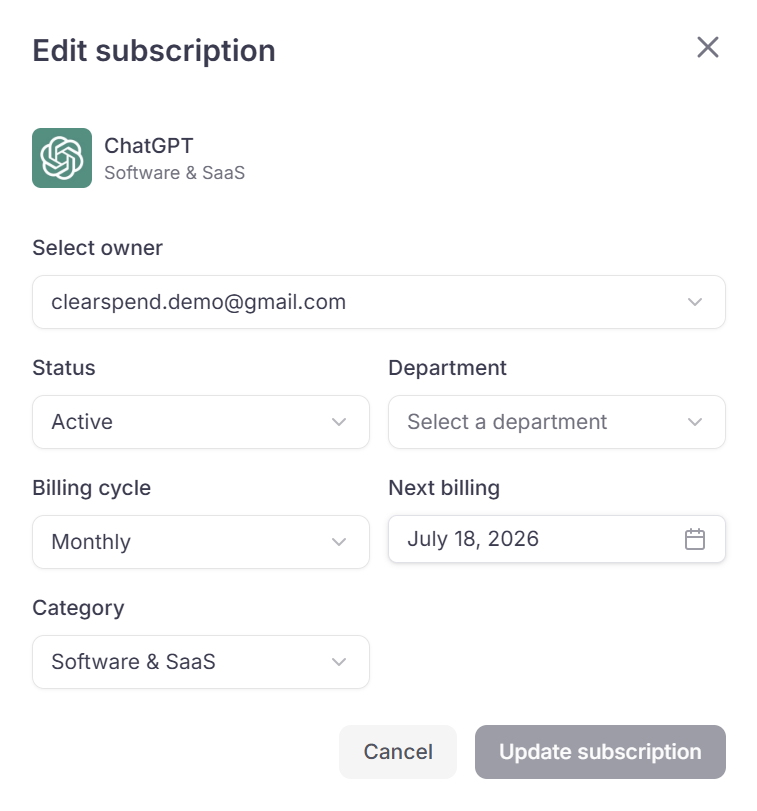
From any row in the Subscriptions table, open the **⋮** menu and click **Edit** to open the edit dialog.
 ## Editable fields
| Field | What it controls |
| ----------------- | -------------------------------------------------------------------------------------------------------------------------------------------------------- |
| **Owner** | The person responsible for this subscription |
| **Status** | Active or Inactive |
| **Department** | Used for departmental spend rollups |
| **Billing Cycle** | Monthly, Quarterly, Semi-Annually, Yearly, or One-time |
| **Next Billing** | The date used for renewal alerts |
| **Category** | Changing from **Others** to any software category includes the subscription in all KPIs and charts; changing it to **Others** removes it from all totals |
Click **Update Subscription** to save or **Cancel** to discard.
Members and above can edit subscriptions. Viewers cannot.
## Something wrong?
| Symptom | What to do |
| ------------------------------------------ | ------------------------------------------------------------------------ |
| Edit option not visible | You may have Viewer role — ask an Admin to change it |
| Category change not reflected in dashboard | Allow a few seconds, then refresh |
| Wrong amounts after category change | See [SaaS vs Non-SaaS](/features/dashboard#saas-spend-vs-non-saas-spend) |
## Related
* [Subscription detail](/features/subscription-detail)
* [Subscriptions](/features/subscriptions)
* [Dashboard KPIs](/features/dashboard-kpis)
## Editable fields
| Field | What it controls |
| ----------------- | -------------------------------------------------------------------------------------------------------------------------------------------------------- |
| **Owner** | The person responsible for this subscription |
| **Status** | Active or Inactive |
| **Department** | Used for departmental spend rollups |
| **Billing Cycle** | Monthly, Quarterly, Semi-Annually, Yearly, or One-time |
| **Next Billing** | The date used for renewal alerts |
| **Category** | Changing from **Others** to any software category includes the subscription in all KPIs and charts; changing it to **Others** removes it from all totals |
Click **Update Subscription** to save or **Cancel** to discard.
Members and above can edit subscriptions. Viewers cannot.
## Something wrong?
| Symptom | What to do |
| ------------------------------------------ | ------------------------------------------------------------------------ |
| Edit option not visible | You may have Viewer role — ask an Admin to change it |
| Category change not reflected in dashboard | Allow a few seconds, then refresh |
| Wrong amounts after category change | See [SaaS vs Non-SaaS](/features/dashboard#saas-spend-vs-non-saas-spend) |
## Related
* [Subscription detail](/features/subscription-detail)
* [Subscriptions](/features/subscriptions)
* [Dashboard KPIs](/features/dashboard-kpis)