> ## Documentation Index
> Fetch the complete documentation index at: https://docs.clearspend.ai/llms.txt
> Use this file to discover all available pages before exploring further.
# Tags and aliases
> Organize subscriptions with tags and aliases so teams can find vendors the way they actually refer to them.
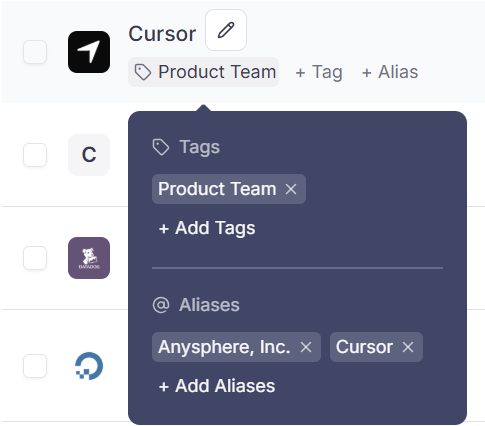
**Tags** group subscriptions (by project, department, etc.). **Aliases** add alternate names next to the canonical vendor name.
 ## When to use tags vs aliases
| | Tags | Aliases |
| ----------- | ----------------------------------- | ----------------------------------- |
| **Purpose** | Filter and group many subscriptions | Rename for your team's vocabulary |
| **Example** | `Design`, `Q4-audit` | "Adobe CC" for Adobe Creative Cloud |
| **Filter** | **Filters → Tags** on Subscriptions | Search only |
***
## Tags
### Add or remove
**Subscriptions → Overview** or [subscription detail](/features/subscription-detail):
1. Click **+ Tag** or **+ Tags**
2. Enter name and save
3. Remove via chip **×**
### Filter
**Filters → Tags** or click any tag chip on a row.
Tags filter appears only after your workspace has at least one tag.
### AI assistants
MCP tools `list_tags` and tag-filtered `list_subscriptions` — [AI assistants](/connect/ai-assistants).
***
## Aliases
1. Click **+ Alias** or **+ Aliases**
2. Enter alternate name
3. Alias shows next to vendor name on list and detail
***
## Related
* [Subscriptions](/features/subscriptions)
* [Choosing integrations](/connect/choosing-integrations)
## When to use tags vs aliases
| | Tags | Aliases |
| ----------- | ----------------------------------- | ----------------------------------- |
| **Purpose** | Filter and group many subscriptions | Rename for your team's vocabulary |
| **Example** | `Design`, `Q4-audit` | "Adobe CC" for Adobe Creative Cloud |
| **Filter** | **Filters → Tags** on Subscriptions | Search only |
***
## Tags
### Add or remove
**Subscriptions → Overview** or [subscription detail](/features/subscription-detail):
1. Click **+ Tag** or **+ Tags**
2. Enter name and save
3. Remove via chip **×**
### Filter
**Filters → Tags** or click any tag chip on a row.
Tags filter appears only after your workspace has at least one tag.
### AI assistants
MCP tools `list_tags` and tag-filtered `list_subscriptions` — [AI assistants](/connect/ai-assistants).
***
## Aliases
1. Click **+ Alias** or **+ Aliases**
2. Enter alternate name
3. Alias shows next to vendor name on list and detail
***
## Related
* [Subscriptions](/features/subscriptions)
* [Choosing integrations](/connect/choosing-integrations)