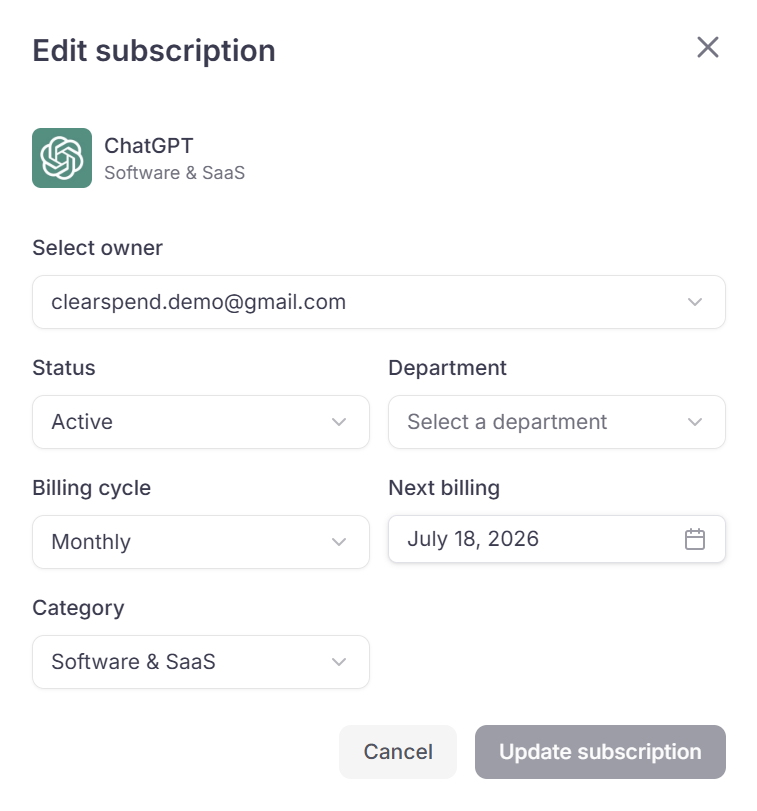
From any row in the Subscriptions table, open the menu and click Edit to open the edit dialog.
Edit subscription modal

Editable fields

FieldWhat it controls
OwnerThe person responsible for this subscription
StatusActive or Inactive
DepartmentUsed for departmental spend rollups
Billing CycleMonthly, Quarterly, Semi-Annually, Yearly, or One-time
Next BillingThe date used for renewal alerts
CategoryChanging from Others to any software category includes the subscription in all KPIs and charts; changing it to Others removes it from all totals
Click Update Subscription to save or Cancel to discard. Members and above can edit subscriptions. Viewers cannot.

Something wrong?

SymptomWhat to do
Edit option not visibleYou may have Viewer role — ask an Admin to change it
Category change not reflected in dashboardAllow a few seconds, then refresh
Wrong amounts after category changeSee SaaS vs Non-SaaS